728x90
반응형
이번엔 빨간색 손과 주황색 손 만든 것을 보겠습니다.
일단 오른손에서 빨간색 손, 주황색 손, 보라색 손을 변경할 수 있는 코드를 만들었습니다.
RightHand.cs
using UnityEngine;

public class RightHand : MonoBehaviour
{
    public Transform[] hands;

    private int currentHandIndex = 0;
    private Transform activeHand;

    private void Start()
    {
        ChangeHand(0);
    }

    private void Update()
    {
        if (Input.GetKeyDown(KeyCode.Alpha1)) ChangeHand(0);
        if (Input.GetKeyDown(KeyCode.Alpha2)) ChangeHand(1);
        if (Input.GetKeyDown(KeyCode.Alpha3)) ChangeHand(2);
    }

    private void ChangeHand(int index)
    {
        if (index == currentHandIndex) return;

        foreach (Transform h in hands) h.gameObject.SetActive(false);

        hands[index].gameObject.SetActive(true);
        activeHand = hands[index];
        currentHandIndex = index;
    }

}
각각 숫자키 1번, 2번, 3번으로 손을 변경하는 코드입니다.
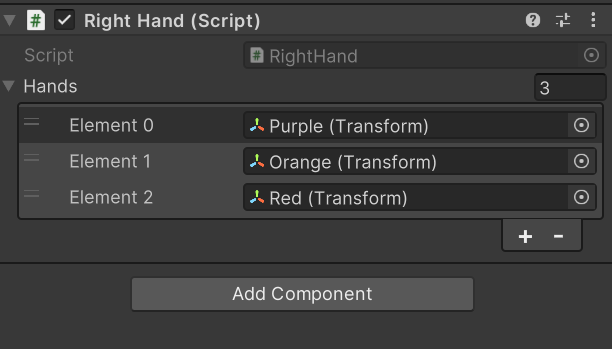
이렇게 GameObject를 배열에 넣어서 사용할 수 있습니다.
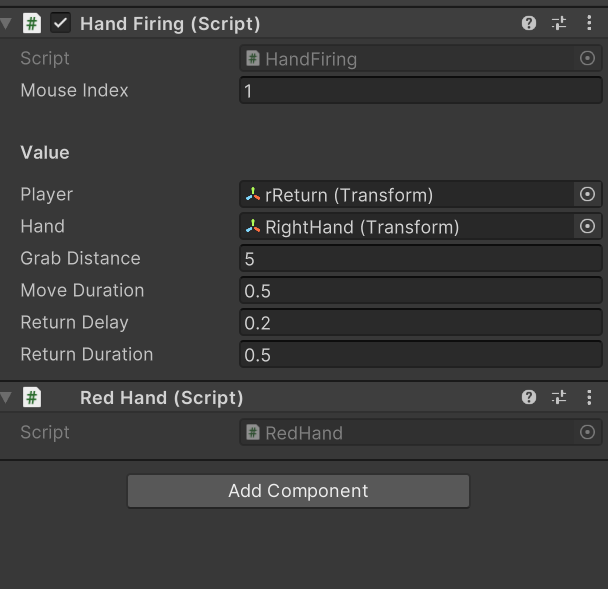
빨간손 GameObject 입니다.
파란색 손을 제외하고는 모두 오른손으로 사용하기 때문에 Mouse Index를 1로 설정했습니다.
RedHand.cs
using UnityEngine;

[RequireComponent(typeof(HandFiring))]
public class RedHand : MonoBehaviour
{
    private void OnTriggerEnter(Collider other)
    {
        if (other.CompareTag("Enemy"))
        {
            Destroy(other.gameObject);
        }
    }

}
빨간손은 적을 처치하는 손입니다.
Trigger로 Enemy와 닿으면 Enemy를 삭제합니다.
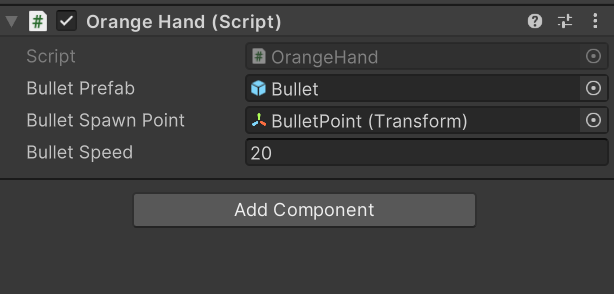
주황색 손 GameObject 입니다.
주황색 손은 총알을 발사하며, 손은 발사하지 않기 때문에 OrangeHand만 있습니다.
OrangeHand.cs
using UnityEngine;

public class OrangeHand : MonoBehaviour
{
    public GameObject bulletPrefab;
    public Transform bulletSpawnPoint;
    public float bulletSpeed = 20f;

    private void Update()
    {
        if (Input.GetMouseButtonDown(1))
        {
            FireBullet();
        }
    }

    private void FireBullet()
    {
        GameObject bullet = Instantiate(bulletPrefab, bulletSpawnPoint.position, bulletPrefab.transform.rotation);
        Rigidbody rb = bullet.GetComponent<Rigidbody>();
        rb.velocity = bulletSpawnPoint.forward * bulletSpeed;
    }

}
간단히 총알을 발사하는 코드입니다.
그리고 손 모양을 내려고 노력 해보았습니다.
수정) 영상과 다르게 총알 발사 위치를 변경 했습니다.
'Unity' 카테고리의 다른 글
| 그랩팩 개발 일지 5 (0) | 2025.02.11 |
|---|---|
| 그랩팩 개발 일지 4 (0) | 2025.02.10 |
| 그랩팩 개발 일지 2 (0) | 2025.02.08 |
| 그랩팩 개발 일지 (0) | 2025.02.07 |
| 지금까지 한 일 2 (0) | 2025.02.06 |