이번에는 BackgroundLoader 코드를 보겠습니다.
BackgroundLoader.cs
using System.Collections;
using System.IO;
using System.Runtime.InteropServices;
using UnityEngine;

public class BackgroundLoader : MonoBehaviour
{
    public SpriteRenderer backgroundRenderer; // 유니티에서 할당할 Sprite Renderer

    [DllImport("user32.dll", CharSet = CharSet.Auto)]
    private static extern int SystemParametersInfo(int uAction, int uParam, System.Text.StringBuilder lpvParam, int fuWinIni);
    private const int SPI_GETDESKWALLPAPER = 0x0073;

    private void Start()
    {
        string path = GetWallpaperPath();
        Debug.Log(path); // 경로 확인

        if (!string.IsNullOrEmpty(path) && File.Exists(path))
        {
            StartCoroutine(LoadWallpaper(path));
        }
        else
        {
            Debug.LogError("배경화면이 단색이거나 파일을 찾을 수 없습니다.");
            Debug.LogError("기본 단색을 적용하겠습니다.");
            ApplySolidColorBackground(Color.blue);
        }
    }

    private string GetWallpaperPath()
    {
        System.Text.StringBuilder path = new System.Text.StringBuilder(200);
        SystemParametersInfo(SPI_GETDESKWALLPAPER, path.Capacity, path, 0);
        return path.ToString();
    }

    private IEnumerator LoadWallpaper(string path)
    {
        byte[] imageBytes = File.ReadAllBytes(path);
        Texture2D texture = new Texture2D(2, 2);
        texture.LoadImage(imageBytes);
        texture.Apply();

        Debug.Log("이미지 로드 성공!");

        // Texture를 Sprite로 변환
        Sprite sprite = TextureToSprite(texture);
        backgroundRenderer.sprite = sprite;

        // 카메라 크기에 맞게 조정
        AdjustBackgroundSize(sprite);

        yield return null;
    }

    private Sprite TextureToSprite(Texture2D texture)
    {
        return Sprite.Create(texture, new Rect(0, 0, texture.width, texture.height), new Vector2(0.5f, 0.5f));
    }

    private void AdjustBackgroundSize(Sprite sprite)
    {
        if (sprite == null) return;

        // 카메라의 크기 구하기 (2D Orthographic 카메라 기준)
        float screenHeight = Camera.main.orthographicSize * 2.0f;
        float screenWidth = screenHeight * Screen.width / Screen.height;

        // 이미지의 원래 가로/세로 비율 유지
        float imageWidth = sprite.bounds.size.x;
        float imageHeight = sprite.bounds.size.y;
        float imageAspect = imageWidth / imageHeight; // 원본 이미지 비율
        float screenAspect = screenWidth / screenHeight; // 화면 비율

        // 비율 맞추기
        float scaleX, scaleY;
        if (imageAspect > screenAspect)
        {
            // 이미지가 더 넓을 경우 → 높이에 맞춰서 크기 조정
            scaleY = screenHeight / imageHeight;
            scaleX = scaleY;
        }
        else
        {
            // 이미지가 더 길쭉할 경우 → 가로에 맞춰서 크기 조정
            scaleX = screenWidth / imageWidth;
            scaleY = scaleX;
        }

        // 크기 적용
        backgroundRenderer.transform.localScale = new Vector3(scaleX, scaleY, 1);
        backgroundRenderer.transform.position = new Vector3(0, 0, 10); // 카메라 안에 배치
    }

    private void ApplySolidColorBackground(Color bgColor)
    {
        Texture2D solidTexture = new Texture2D(1, 1);
        solidTexture.SetPixel(0, 0, bgColor);
        solidTexture.Apply();

        Sprite solidSprite = Sprite.Create(solidTexture, new Rect(0, 0, 1, 1), new Vector2(0.5f, 0.5f));
        backgroundRenderer.sprite = solidSprite;
        backgroundRenderer.transform.localScale = new Vector3(20, 20, 1); // 화면 크기에 맞게 조정
    }


}
using System.Collections;
using System.IO;
using System.Runtime.InteropServices;
using UnityEngine;
using System.Collections;
코루틴 기능을 사용하기 위해 IEnumerator를 포함한 네임스페이스입니다.
using System.IO;
파일 입출력을 위한 네임스페이스로, File.ReadAllBytes() 같은 함수를 사용할 수 있습니다.
using System.Runtime.InteropServices;
Windows의 user32.dll을 사용하여 배경화면 경로를 가져오기 위해 필요합니다.
using UnityEngine;
유니티의 기본적인 기능을 사용하기 위한 필수 네임스페이스입니다.
[DllImport("user32.dll", CharSet = CharSet.Auto)]
private static extern int SystemParametersInfo(int uAction, int uParam, System.Text.StringBuilder lpvParam, int fuWinIni);
private const int SPI_GETDESKWALLPAPER = 0x0073;
[DllImport("user32.dll", CharSet = CharSet.Auto)]
- Windows API를 사용하여 현재 바탕화면 경로를 가져오기 위해 user32.dll을 가져옵니다.
private static extern int SystemParametersInfo(...)
- Windows의 SystemParametersInfo() 함수를 선언하여 사용할 수 있게 합니다.
- SPI_GETDESKWALLPAPER 값을 사용하면 현재 바탕화면의 파일 경로를 가져올 수 있습니다.
private const int SPI_GETDESKWALLPAPER = 0x0073;
- SystemParametersInfo 함수의 인자로 전달할 상수 값으로, 배경화면 경로를 가져오는 역할을 합니다.
private void Start()
{
    string path = GetWallpaperPath();
    Debug.Log(path); // 경로 확인

    if (!string.IsNullOrEmpty(path) && File.Exists(path))
    {
        StartCoroutine(LoadWallpaper(path));
    }
    else
    {
        Debug.LogError("배경화면이 단색이거나 파일을 찾을 수 없습니다.");
        Debug.LogError("기본 단색을 적용하겠습니다.");
        ApplySolidColorBackground(Color.blue);
    }
}
string path = GetWallpaperPath();
- GetWallpaperPath() 함수를 호출해 현재 바탕화면 이미지 경로를 가져옵니다.
if (!string.IsNullOrEmpty(path) && File.Exists(path))
- 경로가 null이 아니고 해당 파일이 실제로 존재하는지 확인합니다.
StartCoroutine(LoadWallpaper(path));
- 파일이 존재하면 코루틴을 이용해 비동기적으로 이미지를 로드합니다.
else 구문
- 배경이 단색이거나 파일이 없으면 오류 메시지를 출력하고 기본 파란색 배경을 적용합니다.
private string GetWallpaperPath()
{
    System.Text.StringBuilder path = new System.Text.StringBuilder(200);
    SystemParametersInfo(SPI_GETDESKWALLPAPER, path.Capacity, path, 0);
    return path.ToString();
}
System.Text.StringBuilder path = new System.Text.StringBuilder(200);
- 최대 200자 크기의 문자열을 저장할 공간을 생성합니다.
SystemParametersInfo(SPI_GETDESKWALLPAPER, path.Capacity, path, 0);
- Windows API를 이용해 현재 바탕화면 이미지의 파일 경로를 가져옵니다.
return path.ToString();
- StringBuilder 값을 일반 문자열로 변환하여 반환합니다.
private IEnumerator LoadWallpaper(string path)
{
    byte[] imageBytes = File.ReadAllBytes(path);
    Texture2D texture = new Texture2D(2, 2);
    texture.LoadImage(imageBytes);
    texture.Apply();
File.ReadAllBytes(path);
- 이미지 파일을 바이트 배열로 읽습니다.
Texture2D texture = new Texture2D(2, 2);
- 기본 크기가 2x2인 Texture2D 객체를 생성합니다.
texture.LoadImage(imageBytes);
- 바이트 데이터를 이용해 텍스처를 생성합니다.
texture.Apply();
- 텍스처를 적용합니다.
Sprite sprite = TextureToSprite(texture);
backgroundRenderer.sprite = sprite;
AdjustBackgroundSize(sprite);
Sprite sprite = TextureToSprite(texture);
- Texture2D를 Sprite로 변환합니다.
backgroundRenderer.sprite = sprite;
- 변환한 스프라이트를 화면에 표시합니다.
AdjustBackgroundSize(sprite);
- 화면 크기에 맞게 배경 크기를 조정합니다.
private void AdjustBackgroundSize(Sprite sprite)
{
    if (sprite == null) return;

    float screenHeight = Camera.main.orthographicSize * 2.0f;
    float screenWidth = screenHeight * Screen.width / Screen.height;
if (sprite == null) return;
- 만약 스프라이트가 없으면 함수 종료.
Camera.main.orthographicSize
- 카메라의 높이를 가져옵니다.
if (imageAspect > screenAspect)
{
    scaleY = screenHeight / imageHeight;
    scaleX = scaleY;
}
else
{
    scaleX = screenWidth / imageWidth;
    scaleY = scaleX;
}
이미지 비율을 유지하면서 화면에 맞게 크기를 조정합니다.
private void ApplySolidColorBackground(Color bgColor)
{
    Texture2D solidTexture = new Texture2D(1, 1);
    solidTexture.SetPixel(0, 0, bgColor);
    solidTexture.Apply();
1x1 크기의 텍스처를 생성하고 단색을 적용합니다.

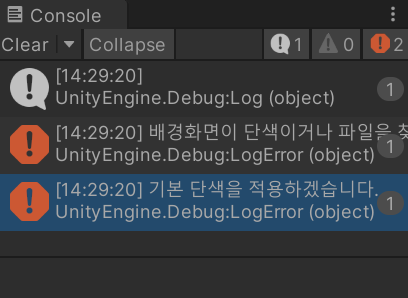
배경화면을 단색으로 설정할 시, 이런 오류 메세지가 뜨며 파란색 박스가 하나 생깁니다.
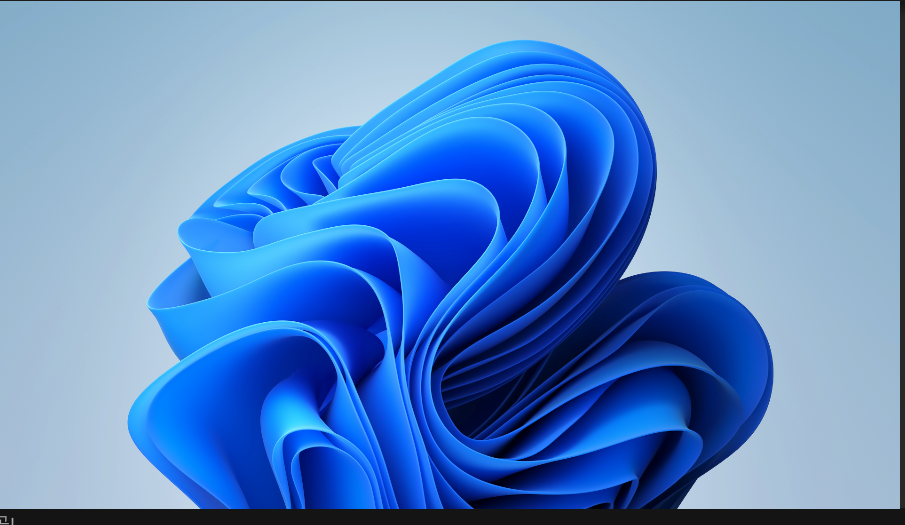
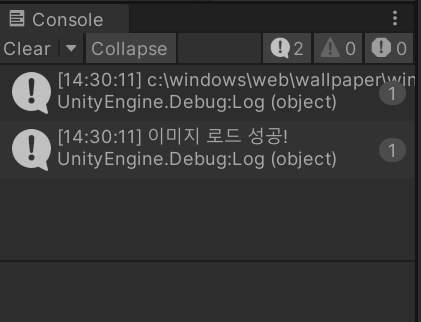
배경화면을 이미지로 설정할 시, 이미지 로드 성공과 함께 유니티에 뜨며, 사진의 경로도 나타나게 됩니다.
너무 어려웠습니다.
'Unity' 카테고리의 다른 글
| 사운드 감지하기 2 (0) | 2025.02.20 |
|---|---|
| 사운드 감지하기 1 (0) | 2025.02.19 |
| 사용자의 배경 화면을 유니티 화면에 띄우기 1 (0) | 2025.02.17 |
| 그랩팩 개발 일지 10 (0) | 2025.02.16 |
| 그랩팩 개발 일지 9 (0) | 2025.02.15 |