728x90
반응형
리플렉션을 배웠습니다.
리플렉션 개념
런타임에 객체의 형식 정보(Type)를 들여다보는 기능입니다.
System.Object 는 형식 정보를 반환하는 GetType 매서드를 보유하고 있습니다.
따라서 모든 데이터 형식은 전부 GetType을 가지고 있습니다.
Type들은 데이터 형식의 모든 정보들을 가지고있습니다.
다음은 int 형식의 주요 정보를 출력하는 프로그램 예제입니다.
MainReflection.cs
using System;
using System.Reflection;
using UnityEngine;

namespace GetType
{
    public class MainReflection : MonoBehaviour
    {
        private void Start()
        {
            int a = 0;
            Type type = a.GetType();

            PrintInterfaces(type);
            PrintFields(type);

            Type b = typeof(int);
            Console.WriteLine(b.Name);
        }

        private static void PrintInterfaces(Type type)
        {
            Debug.Log("-----Interfaces-----");

            Type[] interfaces = type.GetInterfaces();

            foreach (Type i in interfaces)
            {
                Debug.Log($"Name : {i.Name}");
            }
            Debug.Log("");
        }

        static void PrintFields(Type type)
        {
            Debug.Log("-----Fields-----");

            FieldInfo[] fields = type.GetFields
                (BindingFlags.NonPublic | BindingFlags.Public | BindingFlags.Static | BindingFlags.Instance);

            foreach (FieldInfo field in fields)
            {
                String accessLevel = "protected";

                if (field.IsPublic) accessLevel = "public";
                else if (field.IsPrivate) accessLevel = "private";

                Debug.Log($"Access : {accessLevel}, Type : {field.FieldType.Name}, Name : {field.Name}");

            }
            Debug.Log("");
        }


    }
}
별도의 설정을 하지 않으면 GetFields 는 public 멤버변수만 가져옵니다.
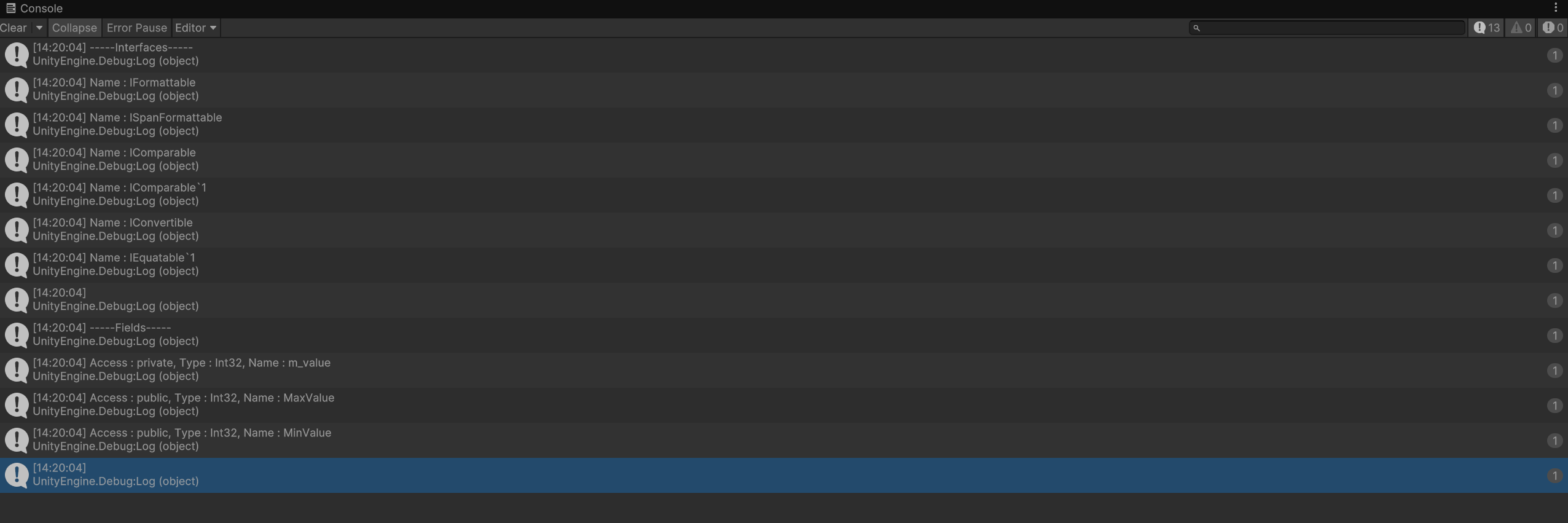
실행 화면입니다.
만약 public private 모두를 출력하고 싶다면 다음과 같이 작성해야 합니다.
FieldInfo[] fields = t.GetFields(BindingFlags.Instance | BindingFlags.NonPublic | BindingFlags.Public);
다음엔 객체를 가져오는 것만 하지 않고 생성까지 하겠습니다.
'Unity' 카테고리의 다른 글
| 수업 내용 복습 5 (0) | 2025.03.18 |
|---|---|
| 수업 내용 복습 4 (0) | 2025.03.17 |
| 수업 내용 복습 2 (0) | 2025.03.10 |
| 수업 내용 복습 1 (0) | 2025.03.09 |
| 3D 테스트 프로젝트 15 (0) | 2025.03.08 |