728x90
반응형
전에는 2d로 이것 저것 공부 했다면, 이번에는 3d로 공부 해보려고 프로젝트를 만들었습니다.
먼저 카메라를 플레이어로 설정하고 NavMesh를 공부하기 시작했습니다.
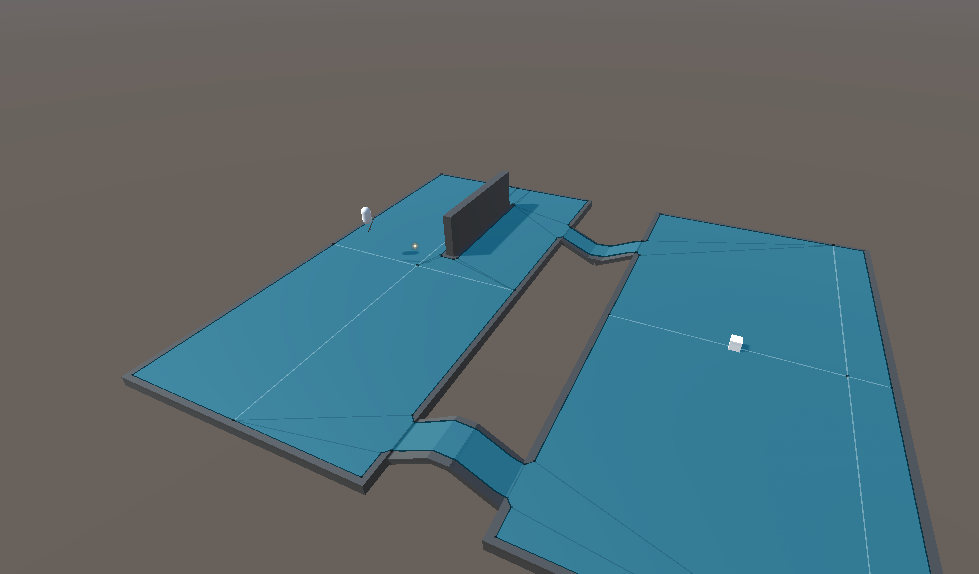
맵을 간단하게 깔고, Navigation을 이용하여 적이 플레이어를 따라 오게 했습니다.
그리고 Navigation을 이용해서 적이 이동 가능한 길을 만들었습니다.
PlayerController.cs
using System.Collections;
using System.Collections.Generic;
using UnityEngine;

public class PlayerController : MonoBehaviour
{
    public float moveSpeed = 5f;
    public float mouseSensitivity = 100f;
    public float jumpHeight = 2f;

    private float xRotation = 0f;
    private CharacterController controller;
    private Vector3 velocity;
    private float gravity = -9.81f;

    void Start()
    {
        Cursor.lockState = CursorLockMode.Locked;
        controller = GetComponent<CharacterController>();
    }

    void Update()
    {
        float mouseX = Input.GetAxis("Mouse X") * mouseSensitivity * Time.deltaTime;
        float mouseY = Input.GetAxis("Mouse Y") * mouseSensitivity * Time.deltaTime;

        xRotation -= mouseY;
        xRotation = Mathf.Clamp(xRotation, -90f, 90f);

        float yRotation = transform.eulerAngles.y + mouseX;

        transform.rotation = Quaternion.Euler(xRotation, yRotation, 0f);

        float moveX = Input.GetAxis("Horizontal");
        float moveZ = Input.GetAxis("Vertical");

        Vector3 move = transform.right * moveX + transform.forward * moveZ;
        controller.Move(move * moveSpeed * Time.deltaTime);

        if (controller.isGrounded && velocity.y < 0)
        {
            velocity.y = -2f;
        }

        if (Input.GetKeyDown(KeyCode.Space) && controller.isGrounded)
        {
            velocity.y = Mathf.Sqrt(jumpHeight * -2f * gravity);
        }

        velocity.y += gravity * Time.deltaTime;
        controller.Move(velocity * Time.deltaTime);
    }
}
간단한 플레이어 움직임입니다.
EnemyAI.cs
using System.Collections;
using System.Collections.Generic;
using UnityEngine;
using UnityEngine.AI;

public class EnemyAI : MonoBehaviour
{
    public Transform player; // 플레이어 위치
    private NavMeshAgent agent; // NavMeshAgent

    void Start()
    {
        agent = GetComponent<NavMeshAgent>(); // NavMeshAgent 가져오기
    }

    void Update()
    {
        if (player != null)
        {
            agent.SetDestination(player.position); // 플레이어를 따라감
        }
    }
}
간단하게 NavMeshAgent를 이용하여 적이 플레이어를 계속 따라 옵니다.
'Unity' 카테고리의 다른 글
| 3D 테스트 프로젝트 3 (0) | 2025.02.24 |
|---|---|
| 3D 테스트 프로젝트 2 (0) | 2025.02.23 |
| 사운드 감지하기 2 (0) | 2025.02.20 |
| 사운드 감지하기 1 (0) | 2025.02.19 |
| 사용자의 배경 화면을 유니티 화면 띄우기 2 (0) | 2025.02.18 |