728x90
반응형
inspector 관련한 Attribute를 소개하겠습니다.
1. [Header]
매개 변수로 헤더로 사용할 string 형식의 단어를 먼저 넘겨줍니다.
inspector에서 변수를 구분지어서 보고 싶을 때 사용합니다.
[Header("수")]
public int _cnt = 1;
public int _type = 2;

[Header("문자")]
public string _one = "One";
public string _two = "Two";

이런 느낌으로 적용 됩니다.
2. [Space] / [Space(float)]
칸을 비워 줍니다.
여기서 float 값은 비워진 칸의 크기라고 할 수 있습니다.
값을 넣지 않고 [Space]만 사용하면 기본값이 적용됩니다.
[Space]
public int _cnt = 1;
public int _type = 2;

[Space(100)]
public string _one = "One";
public string _two = "Two";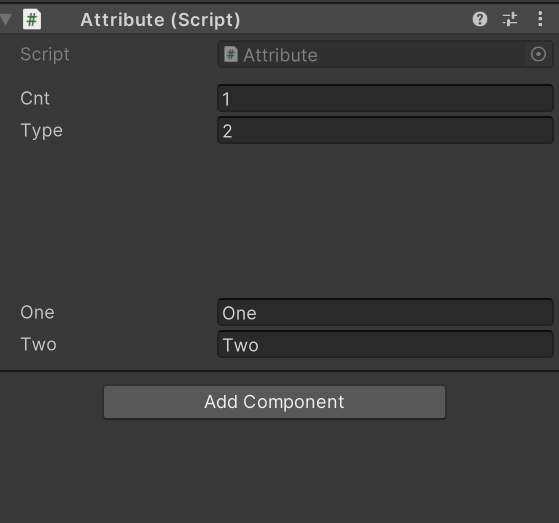
3. [Tooltip(string)]
Tooltip 매개변수로 string 형식의 설명을 넘겨줍니다.
inspector에서 변수명에 마우스를 올리면 설명이 뜨게 됩니다.
[Tooltip("그저 그런 변수")]
public int _cnt = 1;

public int _type = 2;

[Tooltip("그저 그런 수")]
public string _one = "One";

public string _two = "Two";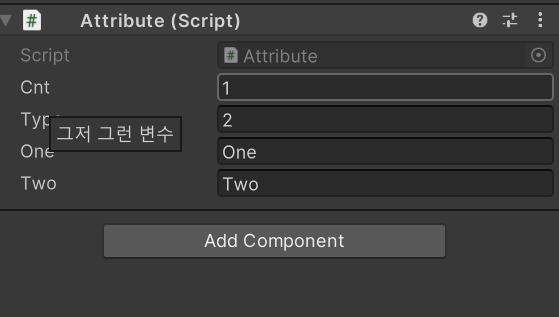
'Unity' 카테고리의 다른 글
| Unity Attribute (4번째 / ?번째) (0) | 2024.10.16 |
|---|---|
| Unity Attribute (3번째/?번째) (2) | 2024.10.16 |
| Unity Attribute (1번째/?번째) (0) | 2024.10.15 |
| Unity Effector 2D 정리글 (Surface Effector 2D) (0) | 2024.09.29 |
| Unity Effector 2D 정리글 (Platform Effector 2D) (0) | 2024.09.29 |